Bomb Farm beginner guide
Updated 2026-09-01
To start Bomb Farm, enable your heroes, turn Battle ON, and let the game fill the available field slots. Your bombers move and plant bombs automatically; you manage who can join the rotation and what to upgrade next.
The game is a free Steam idle RPG from Stream On, released on August 28, 2026. You need the Windows client and a BombFarm account, which supports linking to Steam. Install it from the official Steam page.
Find your way around the mine
The bottom of the game window is your main navigation. Start with Battle, Heroes, and Inventory; the other rooms make more sense once you have something to improve.
| Menu | What to look for |
|---|---|
| Battle | The current stage, the working squad, and the battle ON/OFF state. |
| Heroes | Your roster, individual attributes, and hero abilities. |
| Inventory | The items and unopened drops you have collected. |
| Ritual | Separate operations for equipment, fusion, and hero stars. |
| Abilities | The team-wide skill tree. |
| Map | World selection, difficulty, stage progress, and rewards. |
| House | Resting heroes, recovery, and available capacity. |
| Market | Transfers and links to Steam trading features. |
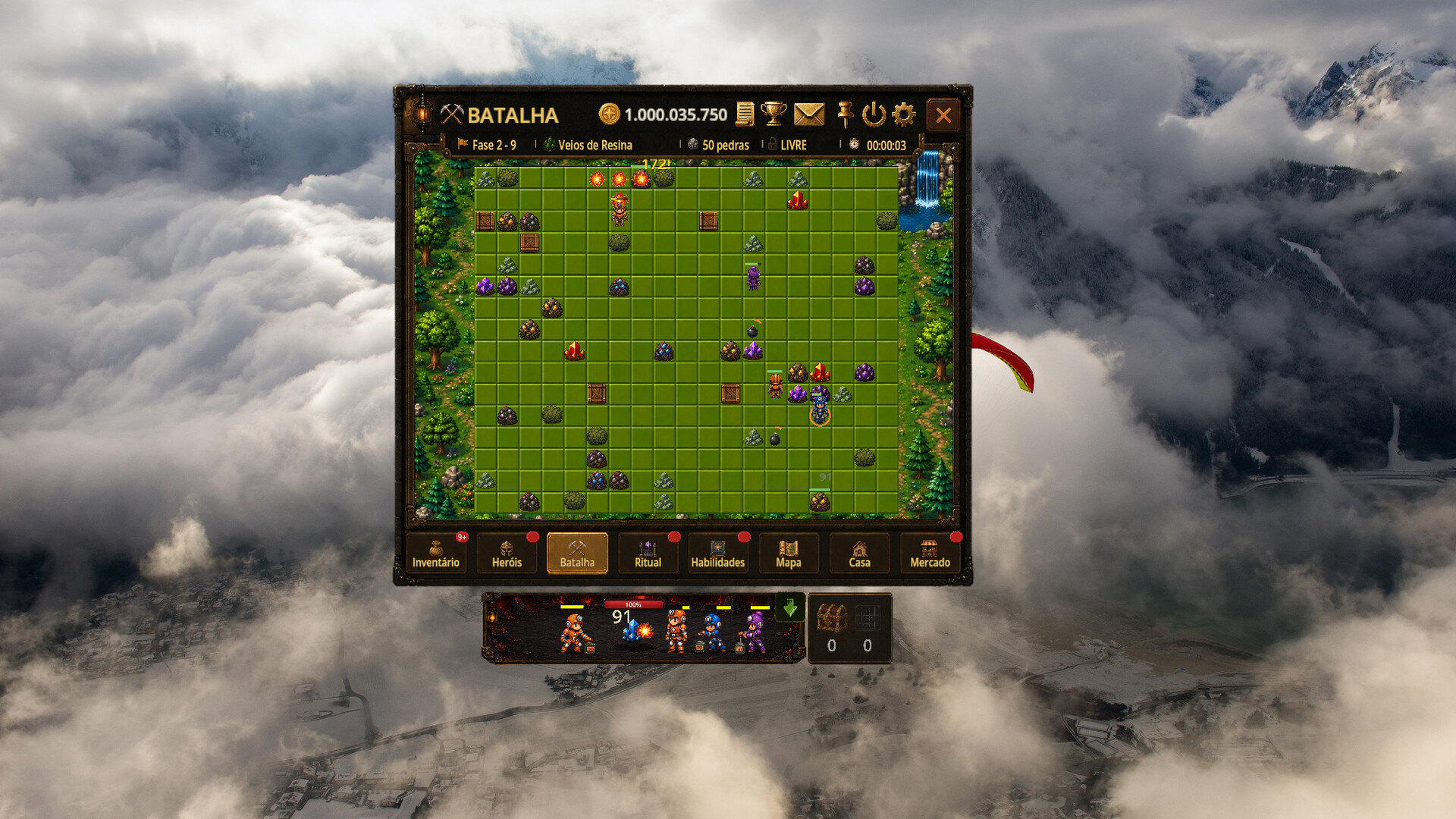
This Steam screenshot uses the Portuguese interface: Batalha is Battle, Heróis is Heroes, Habilidades is Abilities, and Casa is House. The game also lists English, Spanish, and Simplified Chinese interfaces.
Make your first session count
- Open your starter Cages. A new account receives Cages for its first heroes and welcome mail. Look in Inventory for unopened Cages, reveal the heroes, and check Mail for the welcome reward.
- Check Heroes before starting. The crossed-swords ⚔ bench control determines whether a hero joins the rotation. Leave the heroes you want to use enabled. The game chooses ready heroes for the field; you do not steer them around the grid.
- Turn Battle ON. The battle button shows ON/OFF and switches between Swords and House icons. Confirm that a hero appears on the field and starts breaking props. A new account starts with one field slot, so a second ready hero waiting is not necessarily a fault.
- Check the active hero panel. Since the August 31 update, the collapsible Battle panel lists each fighting hero's name, Rank, level, Energy, and Power. Click a hero there to inspect the full details. If nobody is working, check the bench state and energy before spending on upgrades.
- Open the Map before pushing ahead. Confirm the selected world and difficulty, then inspect the next stage's rewards and entry requirement.
- Equip useful drops and claim available rewards. Open collected chests, inspect the equipment, and check the red Store notification for a Daily Reward. Keep useful gear out of fusion until you have chosen which upgrade operation you need.
Share XP is on by default. It splits each destroyed block's XP equally between the heroes actually fighting, which helps a new hero level alongside the others. Waiting and benched heroes do not share that XP. Turning sharing off gives the XP to the hero that broke the block; changes have a 60-second cooldown.
As your roster grows, use the game's three team presets to organize replacements. Energy and teams explains what to check when your working squad slows down.
Watch the interface in motion
Sonecarox's beginner guide is in Brazilian Portuguese. It is useful for recognizing the menus and the flow of a session; follow the current client for prices, timers, and rules that have changed since recording.
Select the preview to watch on YouTube in a new tab.
Before your first big upgrade
Compare heroes within the same rarity when reading Birth Rank. Keep equipment you are currently relying on out of a fusion selection, and check the final confirmation rather than clicking through because an item looks familiar.
If another rested hero is waiting for a place, open Abilities and inspect the first Field Slot node connected to Detonation Reactor. The official skill tree lists this one-time purchase at 3,000 Gold, raising capacity from one hero to two. Compare its cost and prerequisites with the alternative early damage upgrade. Check the displayed cost before buying.
For trading, read the Steam Market rules first. Access and Soulbound behavior changed during launch weekend, so a video saying the Market is temporarily open to everyone is not the current rule.
Sources: Official game manual: heroes and rotation; Official node costs (checked September 1, 2026); Steam store and screenshots; Battle controls and Daily Rewards; XP sharing and the hero panel; Sonecarox's video.